Cursor's Tab Model Was Failing Me in Jupyter Notebooks — So I Made My Own
A brief example of where Cursor's Tab models are causing more trouble than they're worth in a notebook. In this proposed completion, the original function is totally overwritten, and suggestion is essentially useless. Please forgive the blurriness, I want to keep this code private :)
Introduction
There have been debates on what the best way to develop data science workflows is, I have found what works best for me is a good old Jupyter / .ipynb notebook. That's what I used ever since I first started coding, and I don't see myself changing anytime soon. I have anti patterns for sure, but they are my anti patterns dang it. While I know the code must be cleaned and optimized once put in production, that oh so essential ideation stage is still my favorite part.
AI copilots, ranging from GitHub copilot to Cursor Agents have transformed how I do my work. Especially at the latter half of the development cycle, and creating quick optimizations, more thorough documentation, or just auto renaming or updating things I'm now too lazy to do by hand.
There are many limitations and caveats with these tools, but the pain point I've felt the most frustration towards is how these code completion tools (think tab to complete) completely miss the plot of what I try to do when in a notebook. Anecdotally, whenever I want to just print out a pandas dataframe, the auto complete feature from the Cursor tab almost always instead suggests saving it to a csv. That's not how I prefer to do it, so instead I have to delete the completion, and do things by hand. I know files like .cursorrules exist, but from what I understand they do not influence the "Tab" model, and at the same time, I'm not even sure how I'd describe in text what I do. It would be nice if this model learned of my behavior over time, but that's not scalable for Cursor. It is, on the other hand, for me.
Energized by coffee and the starting to get warm weather in NYC, I set out to make my own code completion model, to optimize my notebook experience.
With that context, I'll now share at a high level how I did this, some results, additional benefits of using your own model, and link to some of the inspiration that got me here.
Approach
Data Collection
The collection was pretty straightforward. Basically if there was a file on my computer that ends with .ipynb, I want to look at them. You can definitely filter it by folder or creation date too, obviously not all data is created equal, but I am using all here.
For a better idea of what this data all looked like in the end, I created a TSNE visualization and it looks something like this.
I've anonymized the folder names, but we can see some clear clustering there, and otherwise an assortment of blobs. The key takeaway I have from this though is that when there is overlapping points in a cluster, that's a pattern I follow. Maybe it's how I import functions, or how I make apply statements to notebooks. It's not perfect, but all in all I feel good enough to say some representation of how I code is in there!Dataset Creation
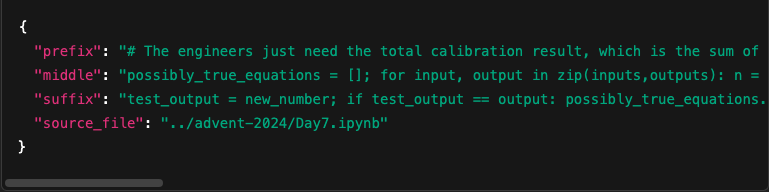
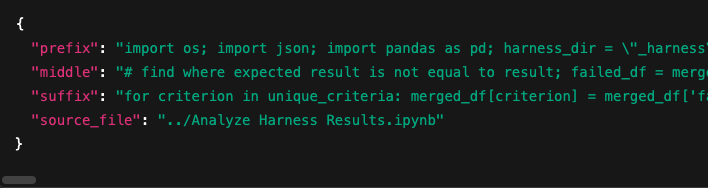
With the notebooks in tow, I had to create a dataset as specific as possible to what I wanted, which was code completion optimized for jupyter notebooks. While learning about these "tab" models I discover "fill-in-the-middle" being the primary way they are prompted, so the dataset had to look like this. This becomes exceptionally annoying in the context of Jupyter notebooks, where code can be semantically linked, but in different cells, or be totally disconnected in the same cell. I don't think I solved this problem totally, but I created a few variations of code completion data based upon my coding patterns.
- Intra-cell: any code completion data all within the same cell.
- Inter-cell: code completion data using multiple cells. These tend to be the largest.
Model Tuning
What's ironic is that this was probably the easiest part! There was a lot trial and error once the model trained. I'm fortunate to already have some battle scars with datasets like this to avoid the most obvious mistakes, leaving only the vastly more troubling subtle ones. After that, libraries like Unsloth allow fine-tuning to happen basically out of the box. I used Lightning AI to secure a GPU for about half an hour while I fine-tuned Qwen 2.5 Coder-3B (base model, not instruct) to predict "middle" based on "prefix" and "suffix" (see the JSONs above to get an idea of what I mean). To keep things economical I used LoRA adapters so that less compute was required and the process was relatively stable.
Conversion
This was a bit annoying to figure out, but since this had to be in Ollama format, I needed a way to convert the adapter components I created into that. Eventually figured it out, and didn't have to install any new libraries thanks to gguf my lora
Afterwards, it's just a matter of following some instructions on the Ollama website.
Integration
For a pretty simple process, I downloaded the Continue extension for VSCode to get a new model for code completions. The instructions here were just as easy, all I had to do was update a config file with the new model name I had just created. After learning more about how Continue passes data from notebooks to the model, I had a chance to refine my model a couple more times, and now have it ready for some close to faithful testing. Note: As a baseline with Continue, I follow their instructions for using an autocomplete model, using the orignal instruction tuned Qwen 2.5 Coder-3B model for comparison.
Results
There are a few different ways to gauge performance. I landed on two main methods. First, is to look at the direct response from the LLM post fine-tuning and comparing it's predictions to the original model. This JSON will take you to some results from my testing & validation set, where you can spot check in a way similar to how I did.
In the future I'd love to make this more robust, where maybe I stratify the dataset based on folder, file creation date, etc. But for now there are a few patterns I notice where this fine-tune is outperforming. The baseline will sometimes not predict anything, or predict some intentional placeholder (i.e. "#Your code here") that I would never do. On top of that the fine tune predictions are often shorter, which leads me to think it'll be easier in deployment to actually verify what I see.
Now let's see how things look once in a notebook! The screenshots below show a very quick example, where we can see the differences between Cursor Tab and my model. For this first test I kind of panicked, but the idea I settled on was to start a jupyter notebook and see how easily it would be to create a basic CNN in Pytorch. Let's see how each model completes the code.
Cursor Tab
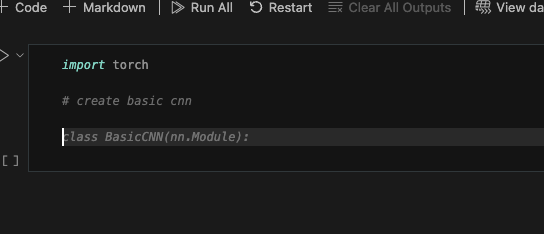
At first glance, this looks totally fine. But from the process, I can point to two things which bothered me. First, you'll see that there's an additional line after the comment to the code. In the other models the autocomplete started right away, but here I needed to take special care to get Cursor Tab running. Not a big deal, but not how I want it. You'll also see that it used nn.Module, despite nn not being defined.
My Model
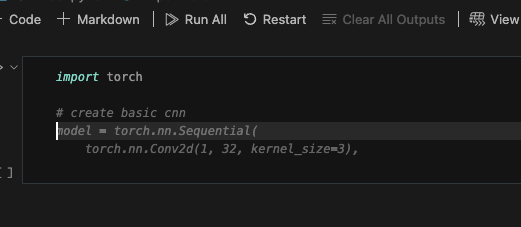
This model is able to complete the code right away! It avoids the nn import issue, started the code immediately on the next line, went to a second line to extend the code, and used the Sequential approach which is a bit more compact / readable for me.
As more comprehensive test, I created a blank folder and started what I'd consider a typical data science workflow. Load a csv, explore the data a bit, train a model, visualize results, save the model, and test the model with a totally new sample. In my humble opinion, this is the whistle tour for deploying a model. Using that as the baseline for an entire workflow, I put to test the three models. Feel free to watch the videos below to see how they did.
No blurring this time, I promise!
Cursor Tab
Continue
My Model
Takeaways
None of the models were perfect, but I think the length of the videos serve as a proxy for effort involved, and clearly it's a good sign that my model was the shortest video. Cursor did not vectorize the data before training, and needed more nudging. Continue failed to split the data into train/test/val sets. My Model did all these things, though I missed autocompleting to get y_pred which it needed for viewing failure cases. Once I went back a cell, it recognized the error and completed it for me.
Added Benefits
On top of the personalization a model like this allows, there are a handful of other benefits.
First, it's hosted locally, so no need to depend on an external API which you don't have control over, and lose access to with your subscription or if you're not connected to the internet.
Secondly, it's efficent. This is a relatively small model, so it's doesn't take up considerable battery life or RAM. That also means the time to predict isn't that bad, making it fast. All of which is valuable.
Thirdly, it could improve over time. The repo linked above shows how you can run and create a model like this, and there's nothing stopping me from updating it on a periodic basis, to keep as up to date as possible with my coding style.
Sources of Inspiration
Thank you so much for reading! Some of the things I saw that got me interested in trying this:
- https://jwuphysics.github.io/blog/2025/04/hello-world-again/ for trying blogging
- https://github.com/prvnsmpth/finetune-code-assistant for how easy it can be to build your own copilot
- https://ae.studio for insightful discussions with colleagues and the motivation to do this
- And lastly, basically anything linked to from this post. Lots of inspiration to build!
Before I Let You Go...
FYI, Cursor Tab is helping me write this post! So it's not all bad. There are also features Tab has that this approach doesn't, like the ability to delete, make mass edits, etc. Those are valuable tools which make the comparison not totally fair, at least in the context of how else Cursor Tab can be a productivity boost.